Weather Pro Launcher
- 4.4
- Rating
- 10.00K
- Installs
- Free
- Price
 Analysis by App-foxy
I approached Weather Pro – Daily Forecast as a practical weather companion rather than a flashy replacement for every weather tool on a phone. My overall impression is that it succeeds when I want two things together: a quick forecast and a live radar view that helps me understand what is happening nearby. That combination gives the app a clearer purpose than a simple temperature screen, although it also means the experience depends on how much detail I personally need from a weather service.
Developed by MG-MagicSoftGaming, this free weather app is aimed at everyday checking rather than specialist meteorology. It is suitable for Everyone, works on Android 7.0 and later, and currently appears as version 1.0.5. Its store summary presents forecasts and live radar, but my useful takeaway is slightly more specific: this is the kind of app I would open before leaving home, planning a short trip, deciding whether to carry an umbrella, or checking whether a weather system is moving toward my area.
Why the forecast and radar combination matters
The strongest part of the concept is the relationship between forecast information and visual movement. A forecast can tell me that rain is possible, but a radar view can help me judge whether precipitation is already approaching, passing over the area, or breaking apart. Those are different decisions. If I am leaving in a few minutes, the radar may be more useful than a general prediction for later in the day.
You May Also Like

 AccuWeather: Weather Radar
AccuWeather Review: A Quick, Clear Forecast for Everyday Decisions
For everyday plans, the best forecast is the one you can understand quickly. AccuWeather makes rain timing, radar, and local conditions easy to act on, with a few trade-offs.

 Hill Climb Racing
Why Hill Climb Racing Still Turns Crashes Into One More Run
A tiny car, a bumpy hill and one more upgrade: Hill Climb Racing keeps resurfacing because its simple chaos makes every near-miss feel personal.

 AliExpress - Shopping App
AliExpress Makes Global Shopping Feel Personal, but Shoppers Bear the Risk
AliExpress turns a global marketplace into a pocket-sized discovery engine. Its reach is useful, its shopping loop compelling, and its trade-offs easy to miss.

 Lords Mobile: Kingdom Wars
Lords Mobile Is a Kingdom-Building Routine, Not a Quick Match
A case-by-case verdict on the building, battles, device demands, and social commitments that make Lords Mobile rewarding for some players and exhausting for others.

 PDF Scanner app - TapScanner
TapScanner Makes Paperwork Easier to Capture, Check, and Share
TapScanner makes scanning with a phone feel less like a rescue operation and more like a dependable step in getting work done. Its capture tools are useful, though not flawless.

 Block Blast!
 Shows How Much a Puzzle Game Can Leave Out
A quiet grid game shows why puzzle players increasingly value instant clarity, repeatable skill and low-pressure play—and where the genre still needs to catch up.
More From Our News Desk
View All News


I also like that the app does not need to be treated as a morning-only tool. A quick glance before commuting, walking the dog, shopping, or driving can answer a more immediate question: is the weather changing around me right now? That makes the live radar more than a decorative extra. It gives the app a practical role during the day, especially when conditions are unsettled.
In my experience, the best way to use it is to separate short-term decisions from longer planning. I would use the forecast to think about clothing, outdoor plans, and the general shape of the day. I would use the radar when timing matters. For example, if I have an appointment across town, I can check the broader outlook first and then look at the radar shortly before leaving. That two-step habit is more reliable than repeatedly refreshing only the temperature.
The app’s average rating is 4.2 from around 63 ratings, with five written reviews, and it has passed 10K installs. Those figures suggest a small but positive early audience rather than a long-established weather platform. I would not treat that as proof that it will suit everyone, but it does indicate that the basic experience has been useful to a number of people.
A realistic day-to-day workflow
Imagine a weekday morning with a short walk to public transport and an outdoor lunch planned later. I would first open the forecast to see the day’s general direction, then check the radar before leaving if the sky looked threatening. If the radar showed a band of rain moving across my route, I could delay the walk, take a coat, or change the lunch plan. Later, I could check again rather than relying on the morning view.
That workflow sounds simple, but it highlights a useful distinction. A weather app is not only a source of facts; it is a decision tool. Weather Pro – Daily Forecast is at its best when I use it to make a small, immediate choice. The radar gives context that a single icon cannot provide, while the forecast keeps the view useful for plans that extend beyond the next few minutes.
There is also a benefit in learning to read the radar as a trend instead of a promise. I would look at the direction and continuity of a weather area, compare it with the forecast, and avoid assuming that every colored patch means the same intensity at street level. This is one of the more important practical tips for using any radar-based weather app: treat it as evidence about movement, not as a perfect guarantee for one exact location.
Where it feels more useful than a basic phone widget
A standard phone widget is excellent for a glance, but it usually compresses the weather into a temperature, an icon, and perhaps a short forecast line. That is convenient when I am already familiar with the day’s conditions. It is less helpful when I need to understand changing rain or decide whether a weather system is close enough to affect a plan.
This app’s value is therefore not simply that it shows weather. Its value is that it encourages a more informed glance. I can move from a broad forecast to a visual check of current conditions without switching between unrelated tools. For someone who regularly makes outdoor decisions, that is a meaningful advantage over a minimal widget.
Compared with a large, feature-heavy weather service, the appeal is different. Bigger alternatives may offer extensive customization, detailed maps, severe-weather layers, long-range charts, or more mature location tools. Those options can be better for users who want to study atmospheric conditions or compare several data views. Weather Pro – Daily Forecast makes more sense for someone who wants a focused route from “what is the day likely to be like?” to “what is moving near me now?”
The limitation I noticed in the overall proposition
The same simplicity that makes the app approachable can become a limitation for experienced weather users. Forecasts and live radar cover an important core, but they do not automatically replace the deeper tools found in specialized services. If I need an extensive set of layers, highly technical atmospheric information, or a detailed planning dashboard, I would probably prefer a more established alternative designed around that level of analysis.
There is also a learning curve in interpreting radar responsibly. A new user may see a colored area and assume it describes exactly what is happening at their doorstep. In reality, radar images need context: movement, timing, intensity, and local conditions all matter. The app can help me see the pattern, but it cannot remove the uncertainty that comes with short-term weather. I consider this a limitation of the use case rather than a reason to dismiss the app, but it is important not to confuse visual confidence with perfect precision.
The relatively small size of its current audience also affects my expectations. With a new app and an early user base, I would approach it as a focused tool that is still proving itself, not as a complete replacement for every weather source. The current version is 1.0.5, so I would keep an eye on how the experience develops over time. That does not make it unsuitable now; it simply means I would value straightforward reliability over assuming a mature ecosystem.
Another point is that the app’s usefulness depends on how quickly I can reach the information I need. A weather tool should reduce friction, especially when I am standing by the door or watching clouds gather. If the forecast and radar views are easy to understand, the app earns a place in my routine. If I find myself needing several extra steps for every simple check, a widget or a familiar built-in weather service may remain faster for basic questions.
Small habits that make the app more effective
My first recommendation is to check the radar in relation to a plan, not randomly. Before a school run, a cycle, a walk, or an outdoor errand, I would look at the forecast for the wider time window and then use the radar closer to departure. This avoids making a decision from an old snapshot while also preventing me from overreacting to a momentary change.
My second recommendation is to compare what the radar suggests with what I can observe outside. If the display indicates approaching precipitation but the sky is still clear, I would use that as a reason to prepare rather than as proof that rain will begin immediately. This habit makes the app more useful because it combines its visual information with local observation instead of asking one screen to do everything.
A third useful approach is to use the app for timing, not just packing. Many people open weather apps only to decide whether they need a jacket. I would also use this one to choose when to leave, whether to move an outdoor task earlier, or whether a short delay might avoid the worst part of a passing system. That is where live radar can change behavior in a practical way.
For travel within the same region, I would check conditions at both ends of the journey when possible. Weather can differ noticeably between a starting point and a destination, and a single local glance may not represent the whole route. The app is more valuable when I think spatially: where am I now, where am I going, and is the weather pattern moving between those places?
Who should choose it, and who should look elsewhere
I would recommend Weather Pro – Daily Forecast to someone who wants a free, approachable weather app with more substance than a basic temperature display. It is especially suitable for people who make frequent outdoor decisions but do not want to study technical charts. Walkers, commuters, parents organizing daily activities, casual travelers, and anyone who likes checking rain movement can understand its appeal quickly.
It is also a sensible choice for users on older Android phones because the minimum operating system is Android 7.0. That broad compatibility makes it easier to consider on devices that are not running the newest software. The Everyone age rating is another indication that the app is intended for general household use rather than a narrow specialist audience.
I would be more cautious about recommending it as the only weather source for safety-critical work, professional outdoor operations, or detailed forecasting. In those situations, I would want a service with the depth, alerting options, and specialist information appropriate to the risk. Likewise, if I mainly need a tiny glanceable widget, the phone’s built-in option may be more convenient and require less interaction.
People who enjoy exploring multiple map layers may also find the app too focused. Its central promise is easy to understand, but users who expect a full meteorological workstation should compare it with a more advanced service. The right question is not whether this app contains every possible weather feature; it is whether its forecast-and-radar pairing matches the way I actually make decisions.
My final view after using the core experience
My verdict is positive, with a clear boundary. Weather Pro – Daily Forecast is a useful everyday weather app because it connects planning information with a live view of changing conditions. I appreciate that it can support both a quick morning check and a more immediate decision before heading outside. The experience feels most worthwhile when I use the radar actively rather than treating the app as another static temperature screen.
At the same time, I would not choose it for advanced weather analysis or assume that a radar image eliminates uncertainty. Its focused design is a strength for casual and practical use, but it may feel limited beside larger services built for detailed users. That trade-off is easy to accept if I want clarity and convenience; it is harder to accept if I expect a complete professional toolkit.
My recommendation is simple: choose it if you want a free forecast app with live radar for everyday decisions, and skip it if you need highly specialized weather analysis. With an average rating of 4.2 and a growing audience, it has made a credible start. I would keep it installed as a practical second opinion for changing conditions, particularly when the question is not just “what is the forecast?” but “what is moving toward me, and how should I plan around it?”
FAQs for Weather Pro Launcher
01What features does Weather Pro – Daily Forecast offer?
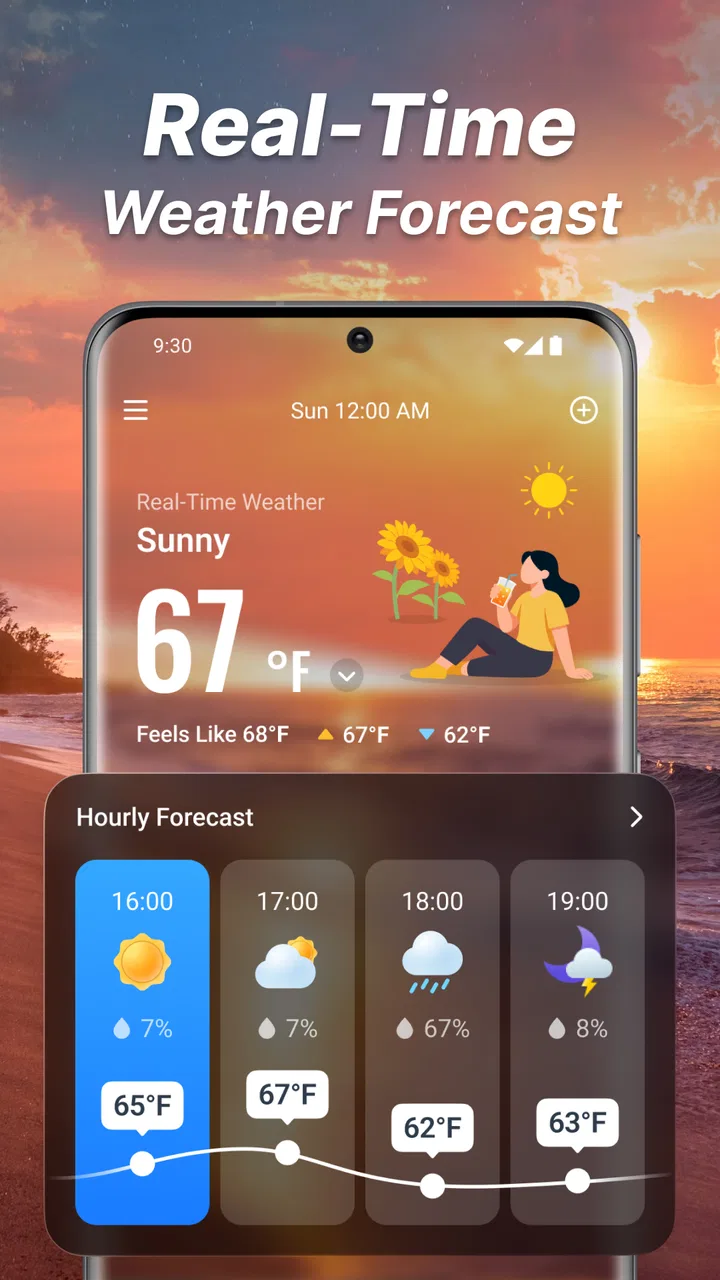
Weather Pro – Daily Forecast provides detailed weather conditions, including temperature, humidity, wind speed, and precipitation levels. It offers hourly and weekly forecasts, severe weather alerts, and radar maps. Additionally, the app includes customizable notifications and widgets for quick access to live updates right from the home screen.
02Is Weather Pro – Daily Forecast free to use, or are there any in-app purchases?
Weather Pro – Daily Forecast is free to download and use, offering basic features without cost. However, it includes optional in-app purchases that unlock premium features such as advanced radar maps, ad-free experience, and extended forecast data. These purchases enhance the overall user experience but are not necessary for core functionality.
03How accurate are the weather forecasts provided by Weather Pro?
Weather Pro – Daily Forecast utilizes data from multiple reliable sources, ensuring high accuracy in its weather predictions. The app uses advanced algorithms and real-time updates to provide precise forecasts. Users generally report satisfaction with the accuracy, though, like all weather apps, occasional discrepancies can occur due to rapidly changing conditions.
04Does Weather Pro – Daily Forecast require an internet connection to function?
Yes, Weather Pro – Daily Forecast requires an internet connection to update weather data and forecasts. While the app can store some previously downloaded information for offline viewing, a connection is necessary for the most up-to-date and accurate forecasts, particularly for real-time alerts and radar maps.
05Can I customize the alerts and notifications in Weather Pro?
Absolutely! Weather Pro – Daily Forecast allows significant customization of alerts and notifications. Users can set preferences for specific weather conditions, such as rain or snow alerts, and choose the frequency of updates. Customization options ensure that you receive timely information relevant to your needs without unnecessary interruptions.
Pros
- Detailed daily and hourly forecasts.
- User-friendly interface with intuitive design.
- Customizable weather alerts.
- Accurate radar and satellite imagery.
- Supports multiple locations for tracking.
Cons
- Contains ads in the free version.
- Some features require a subscription.
- Occasional data update delays.
- Limited customization in free tier.
- Battery usage can be high with frequent updates.

Weather Pro Launcher
Gallery